












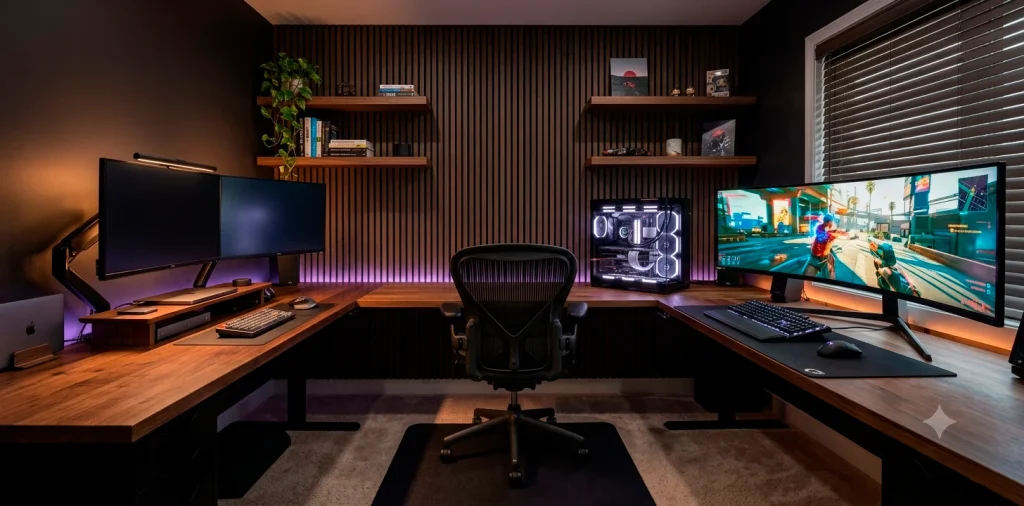

Building a workspace that tackles soul-crushing spreadsheets by day and intense raid bosses by night feels like a balancing act. You want clean professionalism, but your inner gamer craves neon-soaked performance. I spent months tweaking my own battle station to nail this exact blend. Let us build your dream hybrid setup without making it look like a chaotic cyber-café.
The Massive Desk Foundation
You cannot build a legendary hybrid zone on a flimsy wobbly surface. An L-shaped standing desk gives you the perfect canvas to split your workflow physically. I put my work laptop on one side and my glorious gaming rig on the other. This mental separation keeps me sane during grueling nine-to-five shifts. Invest in a thick solid wood or heavy-duty steel frame that supports massive multi-monitor arms without bowing. If you love clean industrial vibes, check out my favorite tips for an industrial home office with steel and wood standing desks to elevate your room design.

The Spine-Saving Throne
Drop the tacky neon racing seats that look like cheap rocket ships. Your lower back will thank you for choosing premium ergonomic office chairs with genuine adjustable lumbar support.
Ever wonder why your neck aches by 3 PM? Cheap foam completely ruins your posture during long corporate meetings or intense late-night raids.
I highly recommend chairs with fully adjustable 4D armrests. These features properly align your wrists and shoulders, maintaining your peak physical health while you conquer deadlines and leaderboard rankings.

Visual Real Estate Displays
A single monitor rarely cuts it anymore when you juggle discord chats, excel sheets, and game windows simultaneously. I swear by a high-refresh-rate ultrawide monitor paired with a secondary vertical screen.
Essential display features:
- A minimum 144Hz refresh rate for buttery smooth gaming.
- IPS panel technology for color-accurate professional design work.
- Dual-input KVM switches to toggle inputs instantly.
This killer hardware combination allows you to swap your display feed between your work laptop and gaming console with a single button press.

The Dual-Identity PC Hub
You need serious horsepower under the hood to run high-end graphics and complex background tasks smoothly.
A high-end custom desktop handles both video rendering and maximum-tier ray tracing without breaking a sweat. IMO, I consider hiding this beautiful machine under the desk an absolute crime. 🎮
Showcase your build on top of your desk using an elegant glass-paneled chassis.
Make sure you select ultra-quiet magnetic levitation fans. Nobody wants their corporate clients hearing a jet engine roaring in the background during an important morning Zoom presentation.

Lighting for Mood and Focus
Bad lighting ruins your focus and causes massive eye strain during long winter nights. I combat this by installing smart RGB bias lighting directly behind my monitors to project a soft glow onto the back wall. For the front, attach a sleek monitor light bar to illuminate your physical workspace without casting annoying reflections on the screen itself. You can easily program smart bulbs to shift from crisp white daylight at 9 AM to warm amber tones at 6 PM. This clever lighting shift signals your brain that work time has finally ended and gaming hours have begun.

Auditory Perfection Gear
Audio makes or breaks your immersion, whether you listen for enemy footsteps or catch critical feedback from your manager. Ditch the built-in monitor speakers immediately because they sound like an ancient tin can.
Top-tier audio hardware:
- Premium studio monitors for rich room-filling background music.
- Open-back headphones for an expansive, detailed gaming soundstage.
- A dedicated XLR microphone on a boom arm for crystal-clear work calls.
Investing in a separate USB audio interface gives you precise tactile volume knobs to control your mic and headphones independently.

Hybrid Input Peripherals
Do you really want to type a fifty-page report on a loud, clicky gaming keyboard that annoys everyone in your house? Absolutely not.
I recommend a hot-swappable mechanical keyboard equipped with lubricated tactile switches. This setup delivers a deeply satisfying typing feel for data entry while remaining incredibly responsive for fast-paced competitive gaming matches.
Pair your custom keyboard with a lightweight wireless gaming mouse featuring programmable side buttons. You can map these handy buttons to excel shortcuts during work hours and weapon switches at night.

Cable Management Mastery
Nothing destroys the visual appeal of an elite workspace faster than a chaotic rat’s nest of tangled black wires dangling beneath your desk. Do yourself a huge favor and mount a heavy-duty metal cable management tray directly to the underside of your desktop. Use reusable hook-and-loop straps to bundle your power bricks and monitor cables into neat, singular lines. Routing your wires cleanly along the desk legs completely hides them from view. This simple weekend project creates a stunning floating aesthetic that makes your entire home office look incredibly professional.

The Power of Personalization
A great battle station should reflect your unique personality, not just look like a boring corporate cubicle or a sterile showroom floor. Frame your favorite gaming art prints or hang sleek floating shelves to display your prized collectible figurines and tech accessories.
A giant felt desk pad adds incredible physical texture and ties your entire color palette together perfectly. If you want to maximize your small space while maintaining a high-tech vibe, explore these sleek designs for a high-gloss attic office with tech forward ideas to inspire your next layout overhaul.

Seamless Connectivity Layout
Lag kills your gaming rank and destroys your productivity during critical video calls.
Run a solid Cat6 ethernet cable directly from your router to your desk for an unbreakable internet connection.
Do you hate swapping cords every single afternoon?
A premium Thunderbolt docking station acts as the central brain of your command center. Connect your monitors, keyboard, mouse, and ethernet to the dock, then swap a single USB-C cable between your corporate laptop and personal gaming rig to switch worlds instantly.

Conclusion
Merging your professional life with your favorite gaming hobby does not require two separate rooms. By selecting a heavy-duty desk, ergonomic seating, smart multi-input displays, and clean cable routing, you build an enviable dual-purpose sanctuary. This ultimate setup respects your daily hustle while elevating your nightly gaming sessions. Which component are you upgrading first? Let me know in the comments below!
Related posts
See All15 Vintage Circus Inspired Details for Playful Kids Bedroom Decor
Bring the magic of the big top home! Discover 15 playful, vintage circus-inspired decor details that will transform your kid's …
Read moreThe Complete Guide to Styling a Dining Room Credenza for Everyday Elegance
Give your dining room credenza the ultimate glow-up. Discover easy, elegant styling tips that balance everyday function with show-stopping design.
Read more15 Dried Citrus and Cinnamon Garlands for a Naturally Cozy Kitchen
Forget mass-produced decorations. Transform your kitchen into a naturally cozy, aromatic sanctuary with these 15 beautiful dried citrus and cinnamon …
Read moreThe Dog-Friendly Camper: Designing a Van Interior for Your Pets
Transform your camper van into the ultimate dog-friendly adventure mobile! Discover clever interior design hacks, durable materials, and cozy setups …
Read more